Correcting Your Internet Explorer Compatibility View Follow

IE Compatibility View Settings
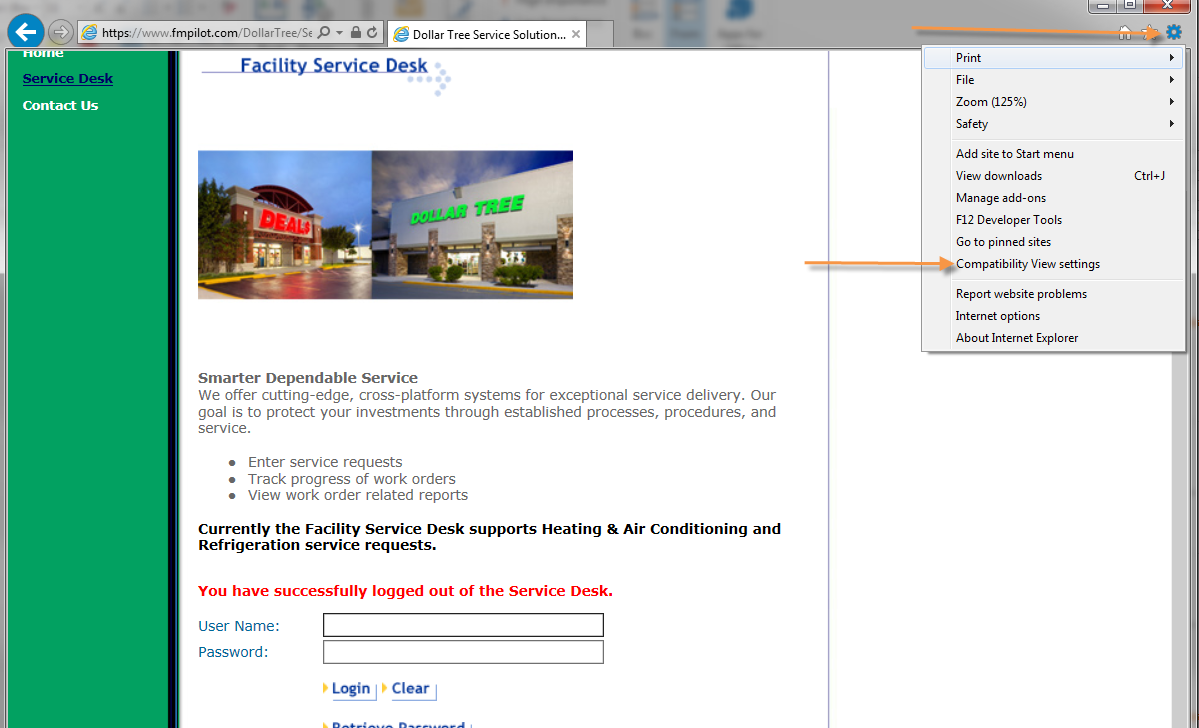
For service providers using any versions of IE newer than v.9, you may need to set your compatibility view settings to accommodate the fmPilot2 site. To do this, please follow the steps below:
1) Go to the login page for fmPilot, but do not log in
2) Click the "Gear wheel" or "settings Icon
3) Select Compatibility View Settings
4) fmPilot.com/ will automatically populate into the add field
5) Click on add. This will move it to the box below
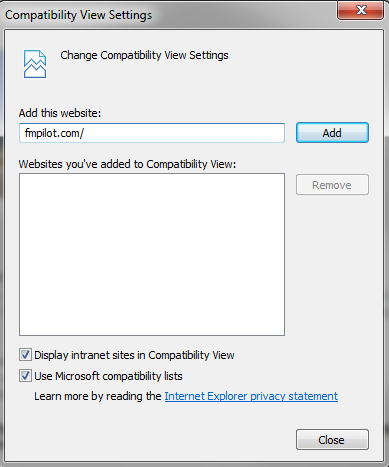
6) Close out of the tools menu
7) Completely exit out of internet explorer by using the X in the top right corner
8) Reopen a new internet explorer and return to the website to log in

Service Provider further warrants that all materials, equipment and labor supplied to CBRE is and shall be free from errors, faults and defects in workmanship, construction, structural and functional design, material and operations and in conformance with the requirements of this Agreement and the applicable Work Order for a period of twelve (12) months following the completion of the Services to CBRE’s satisfaction; provided, that if any longer warranty period is specified for any materials, equipment or workmanship under any plans or specifications, this Agreement, a Work Order or any manufacturer’s warranty, the longer warranty period shall govern. Service Provider shall ensure that all materials and equipment that have a manufacturer’s warranty are registered with the manufacturer in Client’s name.
Comments
0 comments
Article is closed for comments.