Updating your Company Profile Follow

Login to www.fmPilot2.com
1. While on the Vendor Directory click on the Administration Tab and select Company Profile
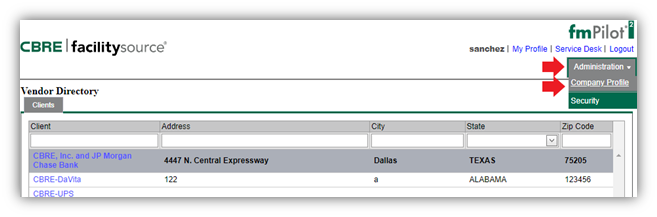
2. While in the Company Profile, click on the "Edit Information" tab and start updating your company profile.
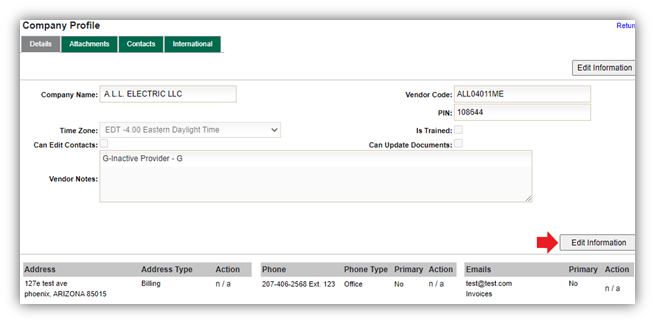
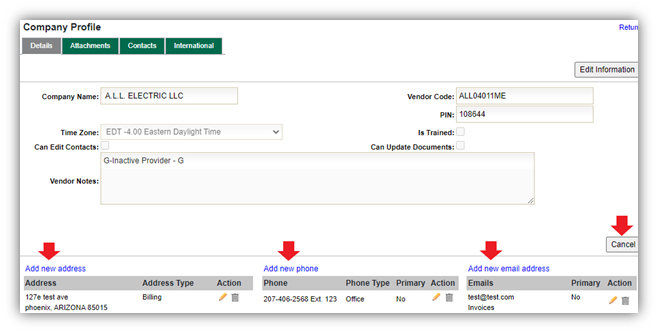
Depending on what you need to Edit: Click Add new address, Add new phone, or Add new email address to make your updates. When you are done click Cancel (it is really a save button) then you are all set!
- To Delete an entry click the grey trash can

- To Edit an entry click the Pencil



- When editing an address or adding a new one, you can also choose the type of address. You can choose if it is a physical address of your business, a billing address, or a mailing address.
PLEASE NOTE: If you need to update your address, please advise the appropriate teams know so that your address can be updated in our other systems as well.
- When editing a phone number or adding a new one, you can choose the phone type of the number. If you list the number as primary, using the check box, it will show up on your work orders as a main contact number. You can also list a number as alternate and it will show up on your work orders too.

- When editing your emails, you can select “Bulk Edit Email Addresses” and an additional window will pop up. On that window, if you select “Add New Email” a blank email space will pop up. You can select “Primary” if you would like the email to show up on your work orders as a primary contact email. You can select the check boxes to receive different notification from fmPilot2 regarding the work order statuses.
PLEASE NOTE: To update your dispatch list, you will need to reach out to Provider Enablement (ProviderEnablement@cbre.com) as that list is in a separate area in the system that providers do not have access to.
NOTE: You do not have access to updating your Company Name, Vendor Code or PIN.

Service Provider further warrants that all materials, equipment and labor supplied to CBRE is and shall be free from errors, faults and defects in workmanship, construction, structural and functional design, material and operations and in conformance with the requirements of this Agreement and the applicable Work Order for a period of twelve (12) months following the completion of the Services to CBRE’s satisfaction; provided, that if any longer warranty period is specified for any materials, equipment or workmanship under any plans or specifications, this Agreement, a Work Order or any manufacturer’s warranty, the longer warranty period shall govern. Service Provider shall ensure that all materials and equipment that have a manufacturer’s warranty are registered with the manufacturer in Client’s name.
Comments
0 comments
Please sign in to leave a comment.