How to Delete a User Follow

Login to www.fmPilot2.com
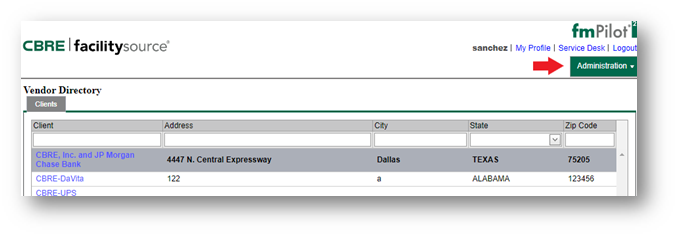
1. While on Vendor Directory click on the Administration Tab
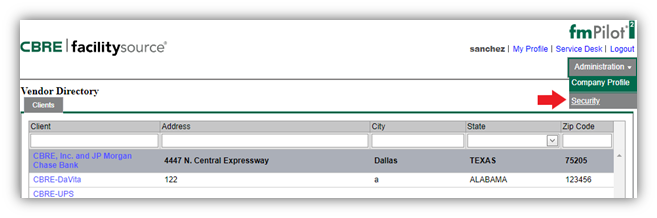
2. Select Security

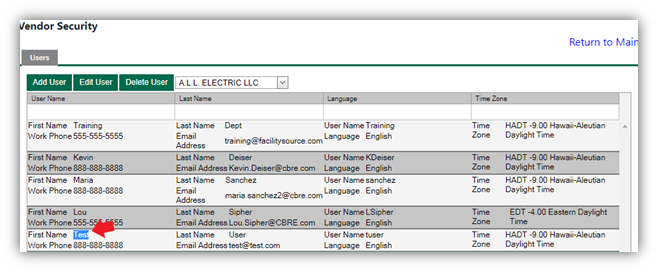
3. Select the User: to select a user Highlight the name of the user.
Double click to highlight. Your highlight will turn blue see below image.
4. Once you select the user Click Delete User; a confirmation pop up will appear on the screen, click OK to complete the Delete action.

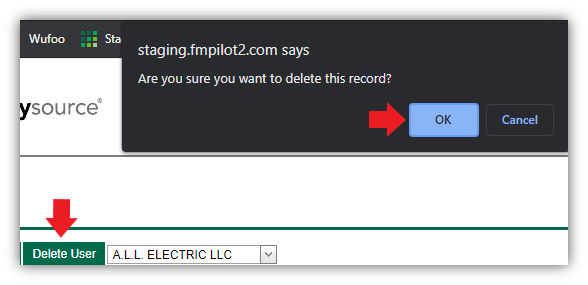
NOTE: Your selected user has now been deleted. The username will no longer be valid. Any attempt to login to fmPilot2 with the deleted username will no longer allow access.

Service Provider further warrants that all materials, equipment and labor supplied to CBRE is and shall be free from errors, faults and defects in workmanship, construction, structural and functional design, material and operations and in conformance with the requirements of this Agreement and the applicable Work Order for a period of twelve (12) months following the completion of the Services to CBRE’s satisfaction; provided, that if any longer warranty period is specified for any materials, equipment or workmanship under any plans or specifications, this Agreement, a Work Order or any manufacturer’s warranty, the longer warranty period shall govern. Service Provider shall ensure that all materials and equipment that have a manufacturer’s warranty are registered with the manufacturer in Client’s name.

Comments
0 comments
Please sign in to leave a comment.